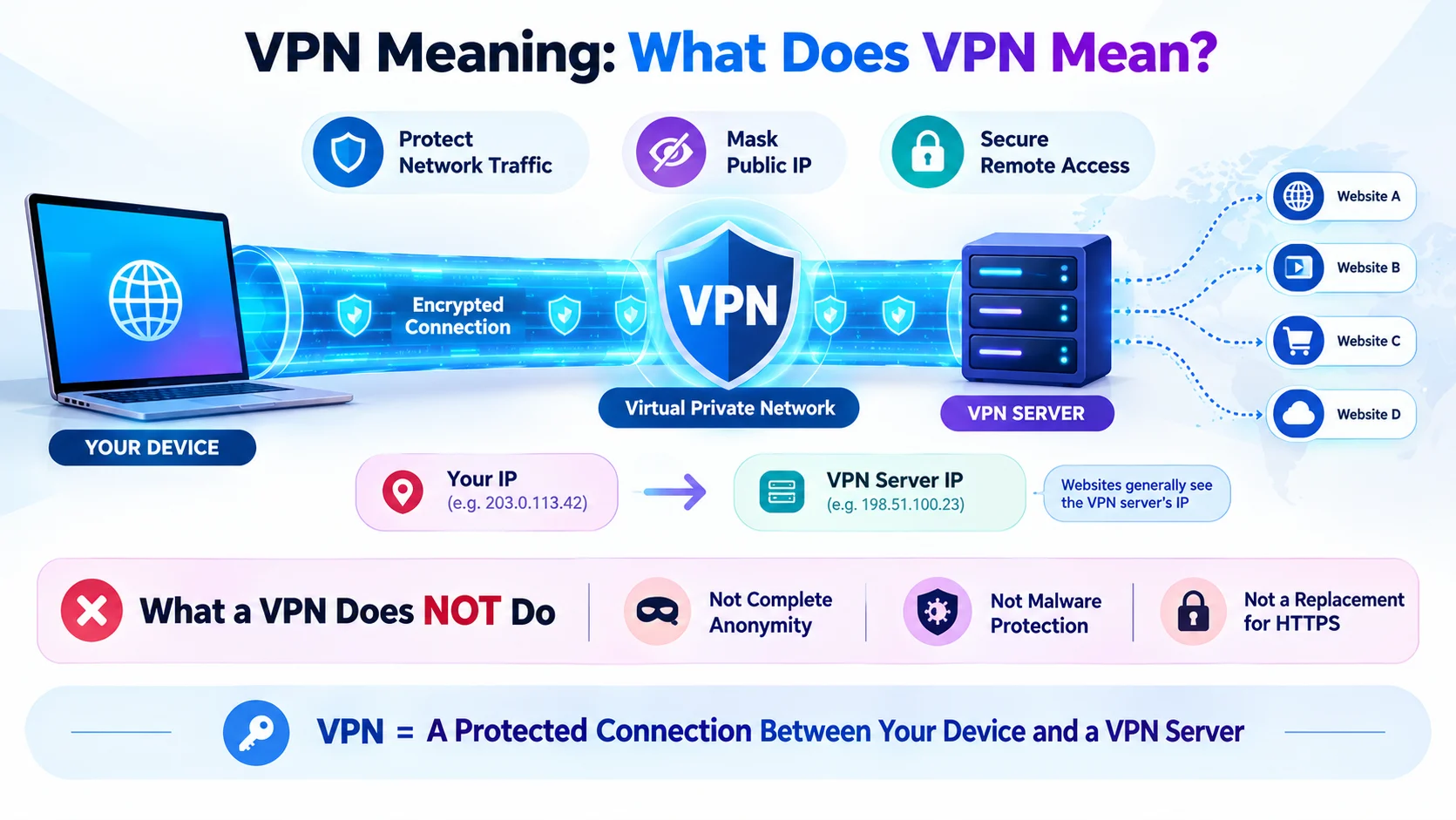
VPN stands for “Virtual Private Network.” A VPN creates an encrypted connection between your device and a VPN server, helping protect your internet traffic from some types of interception and masking your device’s IP address from websites and services you access through the VPN. People commonly use VPNs for privacy, security on public Wi-Fi, remote access to private networks, and changing the apparent location of their internet connection. A VPN does not make you completely anonymous or protect against every online threat.
The VPN meaning is simple: VPN stands for Virtual Private Network. It describes technology that creates a protected connection between your device and a VPN server over a network such as the internet.
When you connect through a VPN, your device sends internet traffic through the VPN connection. The VPN can encrypt traffic between your device and the VPN server, depending on the VPN technology and configuration. In addition, websites you visit through the connection generally see the VPN server’s IP address instead of your device’s original public IP address.
People use VPNs for several reasons. For example, a traveler may use one while connected to public Wi-Fi. A remote employee may use a business VPN to reach company resources. Someone else may want to reduce the amount of browsing information visible to their local network.
However, a VPN is not a magic privacy tool. It does not automatically make you anonymous, prevent malware, or stop websites from identifying you through accounts, cookies, or other techniques.
This guide explains the VPN meaning, how VPNs work, what they protect, what they cannot protect, and how they differ from related technologies.
What Does VPN Mean?
VPN means “Virtual Private Network.”
A VPN creates a protected connection between your device and a VPN server.
In simple terms:
Your device → Encrypted VPN connection → VPN server → Internet
Instead of sending internet traffic directly from your device to an online service, the VPN routes traffic through its server.
A VPN can help:
- Encrypt traffic between your device and the VPN server
- Hide your public IP address from websites you access through the VPN
- Protect data from some forms of interception on untrusted networks
- Connect remote users to private networks
- Provide secure access to business resources
However, a VPN does not guarantee complete anonymity.
What Does VPN Stand For?
VPN stands for:
Virtual Private Network
Each part of the name describes something about the technology.
Virtual
“Virtual” means the network connection exists through software and network technologies rather than requiring a separate physical network connection between every location.
Private
“Private” refers to creating a protected communication path over a network that may otherwise be shared.
It does not mean that everything you do online becomes completely private.
Network
A network connects devices and systems so they can communicate.
Therefore:
Virtual Private Network = a protected network connection created over another network.
What Is a VPN?
A VPN is a technology that routes network traffic through a protected connection to a VPN server.
The exact design depends on the VPN protocol, service, and configuration.
For a typical consumer VPN, the process looks like this:
Device → VPN software → VPN tunnel → VPN server → Internet
The VPN server then communicates with websites and online services on your behalf.
As a result, those services generally see the VPN server’s public IP address rather than your original public IP address.
How Does a VPN Work?
A VPN usually works through several steps.
Step 1: You Connect to a VPN
You open your VPN application or configure a VPN connection on your device.
The app connects to a selected VPN server.
Step 2: The VPN Creates a Protected Connection
The VPN establishes a secure tunnel between your device and the VPN server.
Encryption can protect traffic traveling through this connection from many forms of network interception.
Step 3: Your Traffic Travels Through the VPN Server
Instead of going directly from your device to an online service, traffic travels through the VPN server.
The server then forwards it toward its destination.
Step 4: Websites See the VPN Server’s IP Address
A website typically sees the public IP address associated with the VPN server.
Therefore, the website does not normally see your original public IP address.
Step 5: Responses Return Through the Connection
The requested data travels back through the VPN infrastructure to your device.
The VPN software then provides the data to the appropriate application.
What Is a VPN Tunnel?
A VPN tunnel is a protected communication path created between your device and a VPN endpoint.
The word “tunnel” does not mean that data travels through a physical tunnel.
Instead, it describes how network traffic travels through a logical connection that provides security and routing functions.
Depending on the VPN technology, the tunnel can use encryption and authentication to protect the connection.
What Does a VPN Hide?
A VPN can hide or change some information from certain parties.
For example, a VPN can generally hide your original public IP address from websites that receive your traffic through the VPN.
It can also prevent people on the same local network from simply seeing the contents of properly encrypted VPN traffic between your device and the VPN server.
However, the exact protection depends on the VPN setup.
Your Public IP Address
When you connect to a VPN, websites generally see the VPN server’s IP address.
This can make your internet connection appear to originate from a different network location.
Traffic From Your Device to the VPN Server
A properly configured VPN can encrypt this portion of the connection.
That can provide additional protection when using networks you do not fully trust.
What Does a VPN Not Hide?
A VPN does not hide everything about you.
For example, websites can still identify you through:
- Account logins
- Cookies
- Browser information
- Tracking technologies
- Information you voluntarily provide
- Device characteristics
- Other identification methods
Suppose you log into your Google, Facebook, or banking account while using a VPN.
The VPN does not prevent that service from knowing that the logged-in account belongs to you.
Therefore, VPN privacy is not the same as complete anonymity.
VPN Meaning in Networking
In networking, a VPN is a method for creating a protected connection across an existing network.
Organizations often use VPNs to connect:
- Remote employees
- Branch offices
- Company networks
- Private systems
- Cloud environments
For example, an employee working from home may connect to a company’s VPN.
After authentication, the employee may gain access to internal resources that are not directly exposed to the public internet.
VPN for Remote Work
Businesses often use VPNs to support remote access.
Imagine that a company has an internal application available only to employees on its private network.
A remote employee may connect to the company’s VPN.
The VPN can provide a protected pathway between the employee’s device and the company’s network.
This setup can help organizations control access to internal systems.
However, businesses often combine VPNs with other security measures, such as:
- Multi-factor authentication
- Device management
- Access controls
- Security monitoring
- Endpoint protection
A VPN alone does not provide complete enterprise security.
VPN on Public Wi-Fi
Public Wi-Fi can create privacy and security concerns, especially when users connect to networks they do not control.
A VPN can add protection by encrypting traffic between your device and the VPN server.
For example:
Laptop → Coffee shop Wi-Fi → VPN server → Website
The local Wi-Fi network may still know that your device is connected and communicating with the VPN service. However, it generally cannot simply read the contents of properly encrypted VPN traffic.
Even so, HTTPS remains important.
A VPN should complement normal security practices rather than replace them.
VPN on a Phone
You can use VPN technology on many smartphones.
A VPN app or built-in VPN configuration can route some or all device traffic through the VPN connection.
People may use mobile VPNs when:
- Traveling
- Using public Wi-Fi
- Working remotely
- Protecting network traffic
- Connecting to an organization’s private network
The exact behavior depends on the phone, operating system, VPN app, and configuration.
VPN on a Computer
VPNs can also run on:
- Windows computers
- Mac computers
- Linux systems
- Workstations
- Business devices
A VPN application usually provides a simple interface where you can connect to a server.
Some organizations instead configure VPN connections through operating-system network settings or specialized business software.
VPN for Gaming
Gamers sometimes use VPNs for privacy, network routing, or access to private gaming networks.
A VPN can change the public IP address associated with the connection.
However, using a VPN does not automatically improve gaming performance.
In some cases, the additional routing can increase latency.
Therefore, the effect depends on factors such as:
- Distance to the VPN server
- Server load
- Internet provider
- Game server location
- VPN routing
- Network congestion
VPN for Streaming
Some people use VPNs when accessing online streaming services.
However, streaming platforms may restrict or block VPN connections, and content availability can vary by country and licensing agreements.
A VPN also does not guarantee access to every service or catalog.
Therefore, users should check the terms and availability of the service they use.
VPN and Privacy
Privacy is one of the most common reasons people use VPNs.
A VPN can reduce the amount of information exposed through your local network connection and can mask your original public IP address from websites you access through the VPN.
However, your VPN provider becomes an important part of the privacy equation.
Your traffic does not simply disappear.
Instead, some network visibility shifts from your internet service provider or local network toward the VPN service, depending on the connection and services involved.
Therefore, choosing a VPN provider requires attention to its:
- Privacy practices
- Logging policies
- Security practices
- Ownership
- Reputation
- Jurisdiction
- Technical design
VPN and Security
A VPN can improve security in specific situations.
For example, encryption between your device and the VPN server can make it harder for someone on the same local network to inspect the contents of that VPN traffic.
Still, a VPN does not protect you from every cyber threat.
A VPN does not automatically stop:
- Phishing
- Malware
- Weak passwords
- Account theft
- Unsafe downloads
- Social engineering
- Malicious websites
You still need good security habits.
VPN and IP Addresses
An IP address identifies a device or network endpoint for communication.
Your public IP address can reveal information about your network connection and can often provide an approximate geographic location.
When you use a VPN, websites generally see the VPN server’s IP address.
For example:
Without VPN:
Website → Your public IP
With VPN:
Website → VPN server’s public IP
This is one reason VPNs can change the apparent network location associated with a connection.
Does a VPN Change Your Location?
A VPN can change the apparent network location of your connection by routing traffic through a server in another location.
For example, if your VPN server is in another city or country, websites may see an IP address associated with that location.
However, an IP address is not the same as your precise physical location.
Furthermore, websites and apps may use other location signals, including:
- GPS
- Wi-Fi information
- Browser permissions
- Account information
- Device data
Therefore, a VPN does not necessarily change every form of location information.
Benefits of Using a VPN
A VPN can provide several useful benefits.
Greater Network Privacy
A VPN can protect the connection between your device and the VPN server.
IP Address Masking
Websites generally see the VPN server’s public IP address rather than your original public IP.
Public Wi-Fi Protection
A VPN can add encryption to your connection when using networks you do not control.
Remote Network Access
Businesses can use VPNs to provide employees with secure access to internal resources.
Flexible Network Routing
Users can select different VPN servers and routes, depending on the service.
Limitations of a VPN
VPNs also have important limitations.
A VPN Does Not Make You Anonymous
Websites can still identify you through accounts and other tracking methods.
A VPN Does Not Stop Malware
You still need secure software, careful browsing, and other protections.
A VPN Can Reduce Speed
Encryption and additional routing can sometimes reduce connection performance.
The VPN Provider Matters
Your VPN provider can potentially have visibility into aspects of your connection.
Some Services Block VPNs
Websites and streaming platforms may detect or restrict VPN traffic.
Free VPN vs. Paid VPN
People often ask whether a free VPN is enough.
There is no universal answer.
A VPN service needs resources to operate servers, maintain software, handle traffic, and provide support.
Some free VPNs may impose limits such as:
- Data caps
- Fewer servers
- Lower speeds
- Advertising
- Limited features
More importantly, users should understand how a VPN provider handles data.
Before choosing any VPN, review its privacy practices and business model rather than assuming that “free” means “private.”
Common VPN Protocols
VPN systems can use different protocols.
Examples include:
- WireGuard
- OpenVPN
- IKEv2/IPsec
These technologies use different technical designs and can offer different combinations of security, speed, compatibility, and configuration options.
The average user does not always need to understand every technical detail.
Still, knowing that VPNs use different protocols helps explain why two VPN services may behave differently.
VPN vs. Proxy
A VPN and a proxy can both change the public IP address seen by an online service, but they are not identical.
| Feature | VPN | Proxy |
|---|---|---|
| Main purpose | Protected network connection | Traffic forwarding |
| Encryption | Often provides encrypted tunnel | Depends on proxy type |
| Device coverage | Can cover broad device traffic | Often application-specific |
| Common use | Privacy, security, remote access | Routing and access |
| Security scope | Broader connection protection | Varies greatly |
A proxy does not automatically provide the same protection as a VPN.
VPN vs. Incognito Mode
A VPN and browser incognito mode solve different problems.
Incognito mode mainly limits what the browser saves locally, such as browsing history and some site data.
A VPN changes how network traffic travels between your device and the VPN server.
For example:
Incognito: Helps reduce local browser history.
VPN: Helps protect and route network traffic.
Using incognito mode does not hide your public IP address.
Likewise, a VPN does not stop your browser from storing every type of information outside the private connection.
VPN vs. HTTPS
HTTPS protects communication between your browser and a website when the website supports HTTPS.
A VPN can protect traffic between your device and the VPN server.
These technologies can work together.
For example:
Your device → VPN → HTTPS website
In that situation, the VPN protects the connection to the VPN server, while HTTPS protects the browser-to-website connection.
Therefore, a VPN does not replace HTTPS.
Common VPN Examples
Example 1: Public Wi-Fi
“I use a VPN when connecting to public Wi-Fi.”
Meaning: The person uses a VPN to add protection to their network connection.
Example 2: Remote Work
“Connect to the company VPN before opening the internal dashboard.”
Meaning: The employee needs a protected connection to access company resources.
Example 3: Privacy
“The VPN hides my public IP address from websites I visit through the VPN.”
Meaning: Websites generally see the VPN server’s IP address instead.
Example 4: Travel
“I connected to a VPN while traveling.”
Meaning: The person used a VPN to route their internet traffic through a VPN server.
Example 5: Technical Support
“The administrator asked me to connect to the corporate VPN.”
Meaning: The user needs access to a private organizational network.
Common Misconceptions About VPNs
Misconception 1: A VPN Makes You Completely Anonymous
This is not true.
A VPN can mask your public IP address from websites, but websites can still identify users through accounts, cookies, browser data, and other methods.
Misconception 2: A VPN Protects Against All Hackers
A VPN does not eliminate every cybersecurity threat.
Phishing, malware, stolen passwords, and unsafe downloads remain possible.
Misconception 3: A VPN Is the Same as Incognito Mode
These technologies have different purposes.
Incognito mode affects local browser behavior, while a VPN affects network routing and can encrypt the connection to the VPN server.
Misconception 4: Every VPN Is Equally Private
VPN services differ.
Their infrastructure, logging practices, security controls, ownership, and business models can vary.
Misconception 5: A VPN Always Makes the Internet Faster
A VPN can sometimes reduce speed because traffic travels through additional infrastructure.
Performance depends on the network and VPN server.
How to Choose a VPN
If you are considering a VPN, examine several factors.
Privacy Policy
Understand what information the provider collects and retains.
Security
Look for modern security technology and transparent practices.
Server Network
A broader server network can provide more routing choices.
Speed
Check whether the service meets your normal bandwidth needs.
Device Support
Make sure it supports the devices and operating systems you use.
Reputation
Consider the provider’s track record and transparency.
Price
Compare the cost with the features and privacy practices offered.
VPN Meaning in Simple Terms
If you need the shortest explanation:
VPN = Virtual Private Network.
A VPN creates a protected connection between your device and a VPN server.
It can:
Encrypt certain network traffic → Route it through a VPN server → Mask your public IP address
It cannot:
Make you completely anonymous → Stop all malware → Replace safe browsing → Guarantee privacy from the VPN provider
That distinction provides the clearest understanding of what a VPN actually does.
VPN Meaning: Quick Reference
| Question | Answer |
|---|---|
| What does VPN mean? | Virtual Private Network |
| What does VPN stand for? | Virtual Private Network |
| What is a VPN? | Technology that creates a protected network connection |
| What does a VPN do? | It can encrypt traffic to a VPN server and mask your public IP address |
| Does a VPN hide your IP? | Generally, websites see the VPN server’s IP instead of your original public IP |
| Does a VPN make you anonymous? | No |
| Does a VPN protect against malware? | Not by itself |
| Can a VPN change your apparent location? | It can change the location associated with your public IP |
| Can a VPN slow down the internet? | Yes, depending on routing and network conditions |
| Is VPN the same as incognito mode? | No |
| Is VPN the same as a proxy? | No |
| Can businesses use VPNs? | Yes, especially for secure remote access |
Frequently Asked Questions
What does VPN mean?
VPN means Virtual Private Network. It is technology that creates a protected connection between a device and a VPN endpoint, often a VPN server.
What does VPN stand for?
VPN stands for Virtual Private Network.
What is a VPN in simple words?
A VPN is a tool that routes your internet traffic through a VPN server and can encrypt the connection between your device and that server.
What does a VPN do?
A VPN can protect traffic between your device and the VPN server and hide your original public IP address from websites that receive your traffic through the VPN.
Does a VPN hide your IP address?
Generally, yes. When you use a VPN, websites usually see the VPN server’s public IP address rather than your original public IP address.
Does a VPN make you anonymous?
No. A VPN can improve privacy, but it does not guarantee anonymity. Websites can still use accounts, cookies, browser information, and other signals to identify or track users.
Is a VPN safe?
A VPN can improve network security in certain situations, but safety depends on the VPN provider, configuration, protocol, device, and overall security practices.
Does a VPN protect you on public Wi-Fi?
A properly configured VPN can add encryption between your device and the VPN server, which can help protect traffic on untrusted networks.
Does a VPN slow down your internet?
It can. Additional encryption and routing may reduce speed or increase latency. The effect varies by VPN service, server, distance, and network conditions.
Is a VPN the same as incognito mode?
No. Incognito mode mainly changes what your browser stores locally. A VPN changes network routing and can encrypt traffic between your device and the VPN server.
Is a VPN the same as a proxy?
No. Both can route traffic through another server, but a VPN generally provides a broader protected network connection, while proxies vary significantly in how they handle traffic and security.
Can a VPN change your location?
A VPN can change the apparent location associated with your public IP address. However, it does not necessarily change GPS or other location information.
Can a VPN protect against hackers?
A VPN can protect certain network traffic, but it does not stop every form of cyberattack. Strong passwords, multi-factor authentication, software updates, and safe browsing still matter.
Can a VPN protect against phishing?
Not necessarily. A VPN does not automatically recognize or block every phishing attempt. Users still need to check links, domains, messages, and account requests carefully.
Why do companies use VPNs?
Companies can use VPNs to provide employees with protected access to internal systems and private network resources.
Can I use a VPN on my phone?
Yes. Many smartphones support VPN applications or built-in VPN configurations.
What is a VPN server?
A VPN server is a server that receives VPN connections from users and routes their network traffic according to the VPN configuration.
What is a VPN tunnel?
A VPN tunnel is a logical protected connection through which network traffic travels between VPN endpoints.
Is a free VPN safe?
Safety varies by provider. Before using a free VPN, examine its privacy practices, data collection, security, ownership, and business model.
Does a VPN stop websites from tracking me?
No. A VPN can hide your original public IP address, but websites can still use accounts, cookies, browser characteristics, and other tracking methods.
Conclusion
The VPN meaning is Virtual Private Network. A VPN creates a protected connection between your device and a VPN server, allowing network traffic to travel through that connection.
For many users, the main benefits include IP address masking, additional network privacy, public Wi-Fi protection, and secure remote access. Businesses can also use VPNs to connect employees with private company resources.
However, a VPN does not provide complete anonymity or protect against every online threat. Websites can still recognize logged-in users, tracking technologies can still operate, and malware or phishing attacks can still succeed.
The easiest way to remember the concept is:
VPN = a protected network connection that can route your traffic through another server.
Understanding that distinction helps you use VPN technology realistically. A VPN can be a useful privacy and security tool, but it works best alongside HTTPS, strong passwords, multi-factor authentication, updated software, and careful online habits.

Harry Edwards is a language writer specializing in word meanings, synonyms, and language usage. He creates clear, accurate, and engaging content to help readers improve their vocabulary and communication skills.







2 thoughts on “VPN Meaning| What Does VPN Mean and How Does It Work?”