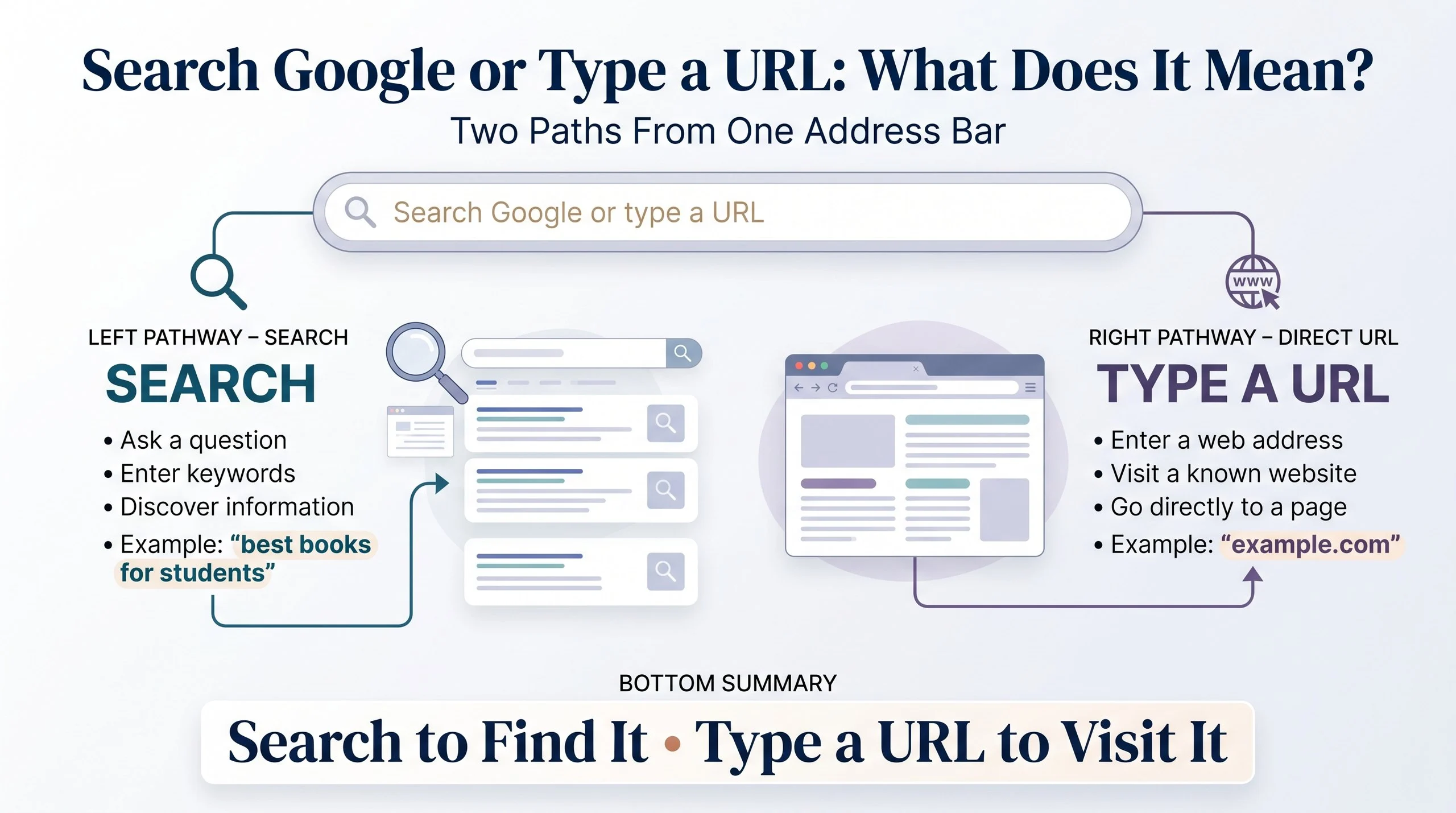
“Search Google or type a URL” is a browser prompt that tells you what you can enter into the address bar. You can type words or questions to search the web, or enter a website address, also called a URL, to open a specific webpage directly. The phrase commonly appears on browser new-tab pages and in address bars.
If you have ever opened a new browser tab and seen “search Google or type a URL,” you may have wondered exactly what the message means. The phrase is simple, but it describes two different ways to navigate the internet.
You can search for information by entering words, questions, or phrases into the browser’s address bar. Alternatively, you can type a URL when you already know which website or webpage you want to visit. In both cases, the browser uses the same general input area to help you reach your destination.
For example, typing “best restaurants near me” usually starts a search. On the other hand, entering “wikipedia.org” takes you toward a specific website.
The phrase is especially associated with Google Chrome, where the address bar also functions as a search box. This combined feature makes browsing faster because you do not always need to open a separate search website first.
Understanding the difference between these two options can make everyday internet use easier. It also helps explain terms such as URL, address bar, search engine, website, domain, and search query.
| Meaning | Context | Primary Platforms | Example | Tone |
|---|---|---|---|---|
| An instruction to search the web or enter a website address | Web browsing and internet navigation | Chrome and other browsers | Type “weather today” to search or “example.com” to visit a site | Neutral, helpful |
What Does “Search Google or Type a URL” Mean?
“Search Google or type a URL” means you can use the browser’s address bar in two main ways:
- Search Google for information.
- Type a URL to visit a particular website or webpage.
The browser does not require you to decide which method to use before typing. Instead, it identifies what you entered and responds accordingly.
For instance, suppose you type:
cute cat names
The browser can treat those words as a search query and show relevant search results.
Now suppose you enter:
example.com
The browser recognizes that you are probably trying to visit a website.
Therefore, the phrase is essentially an instruction that says:
“Tell me what you’re looking for, or tell me which website you want to visit.”
This makes the address bar a multifunctional tool rather than merely a place for website addresses.
What Is a URL?
A URL is a Uniform Resource Locator. In simple terms, it is the web address used to locate a particular resource online.
For example:
A URL can identify a website, webpage, image, document, or another online resource.
A typical URL may contain several parts.
Protocol
The beginning might be:
https://
This indicates the communication protocol used to access the resource.
Domain Name
The domain might be:
example.com
This is the recognizable web address associated with a website.
Path
A URL can also contain a path, such as:
example.com/blog/article
The path identifies a particular location within the website.
Query Parameters
Some URLs contain additional information after a question mark.
For example:
example.com/search?q=books
The extra section can tell the website what information to display.
You do not need to understand every technical part of a URL to use a browser. In everyday browsing, simply knowing that a URL is a web address is usually enough.
What Is the Address Bar?
The address bar is the field near the top of a web browser where you can enter a website address or search query.
Depending on the browser, it may also be called the:
- Address bar
- Omnibox
- Search and address bar
- URL bar
In Google Chrome, the address bar is designed to handle both searches and URLs.
That is why you may see “Search Google or type a URL” when you open a new tab.
Instead of having one box for searches and another for websites, the browser combines both functions into one convenient location.
How Does the Address Bar Know What You Mean?
You might wonder how a browser distinguishes between a search and a URL.
Modern browsers analyze what you type and determine the most appropriate action.
Consider these examples:
Input:
how to bake cookies
This looks like a search query, so the browser sends it to the default search engine.
Input:
youtube.com
This looks like a domain name, so the browser attempts to open the website.
Input:
This is clearly a complete URL, so the browser navigates directly to that address.
Sometimes the distinction is less obvious. A short phrase could potentially be a website name or a search query. In those cases, the browser uses its built-in rules and search settings to decide what to do.
Search Google vs. Type a URL
Although both actions use the same address bar, they serve different purposes.
| Search Google | Type a URL |
|---|---|
| Finds information | Opens a known web address |
| Uses search terms | Uses a website address |
| Can return many results | Usually goes to a specific destination |
| Useful when you don’t know the exact website | Useful when you know the website |
| Example: “best laptops” | Example: “example.com” |
The easiest way to remember the difference is:
Search when you want to find something.
Type a URL when you already know where you want to go.
Example: Searching Google
Imagine you want to learn about photography.
You open your browser and type:
beginner photography tips
The browser treats this as a search query.
Instead of opening one specific website, it presents search results from different websites.
You can then choose the result that best answers your question.
This approach is useful when:
- You don’t know which website has the answer.
- You want to compare several sources.
- You are researching a topic.
- You are looking for news or current information.
- You want product reviews.
- You are trying to discover a website.
Example: Typing a URL
Now imagine you already know that the information you want is on a particular website.
You could type its web address directly into the address bar.
For example:
example.com
The browser attempts to open that website rather than treating your input as a general question.
Direct URLs are especially useful when you frequently visit certain websites.
For instance, someone might type the address of their:
- Email service
- School portal
- Work dashboard
- Online banking website
- Favorite news site
- Cloud storage service
This can be faster than searching for the website every time.
Why Does Chrome Say “Search Google or Type a URL”?
Google Chrome combines search and navigation in its address bar.
When you open a new tab, Chrome may display “Search Google or type a URL” to explain what you can do there.
The message is not an error.
It does not mean that your internet connection is broken.
It simply tells you that the field accepts either:
- Search terms
- Questions
- Keywords
- Website addresses
- Complete URLs
The wording is therefore an instruction rather than a notification.
Is “Search Google or Type a URL” a Search Engine?
No.
The phrase itself is not a search engine.
Instead, it is an instruction displayed by a browser interface. Google may be the default search engine, but the address bar belongs to the browser.
This distinction is important because a browser and a search engine are different things.
Browser
A browser is software used to access websites.
Examples include:
- Google Chrome
- Microsoft Edge
- Mozilla Firefox
- Safari
- Opera
Search Engine
A search engine helps you find information across the web.
Examples include:
- Bing
- DuckDuckGo
- Yahoo
A browser can use a search engine to process searches.
Browser vs. Search Engine
The difference becomes easier with an everyday example.
Think of a browser as a vehicle that takes you around the internet.
A search engine is more like a map or directory that helps you find a destination.
When you type a search query into Chrome, the browser sends that query to the selected search engine.
When you enter a URL, the browser can navigate directly to the specified address.
Therefore, Chrome and Google are not exactly the same thing.
Chrome is a browser.
Google Search is a search engine.
Can You Search Without Typing “Google”?
Yes.
When your browser is configured to use Google as its default search engine, you can simply enter your search terms into the address bar.
For example:
best books for students
You don’t need to type:
google.com
first.
The browser can send the search directly to Google.
This is one reason the combined address-and-search bar is convenient.
Can You Type a URL Into Google Search?
Yes, but it is usually unnecessary.
Suppose you want to visit:
example.com
You could search for “example.com” and then click a result.
However, if you already know the correct URL, typing it directly into the address bar is generally more direct.
There is little reason to search for a website when you already have its exact web address.
What Happens When You Type a Question?
The address bar can also handle natural-language questions.
For example:
What is the capital of France?
The browser treats this as a search query.
The search engine may then provide an answer, websites, images, videos, or other relevant information.
This makes modern browsers useful for both navigation and information discovery.
You do not need to use special commands.
Simply type what you want to find.
What Happens When You Type a Website Name?
Suppose you enter:
Wikipedia
The browser may interpret this as a search because it does not necessarily represent a complete URL.
You might see search results for Wikipedia.
However, if you enter:
wikipedia.org
the browser can recognize the domain and navigate directly to it.
This difference explains why adding a domain extension such as .com, .org, or another valid extension can change how the browser handles your input.
What Are Common URL Extensions?
A domain extension is the ending portion of a domain name.
Common examples include:
.com.org.net.edu.gov
Country-specific extensions also exist, such as:
.uk.ca.au.pk.in
The extension can sometimes provide information about the website or organization, although it should not automatically be treated as proof that a website is trustworthy.
What Does HTTPS Mean in a URL?
You may see URLs beginning with:
https://
HTTPS is a secure version of the HTTP protocol.
In simple terms, HTTPS helps protect data exchanged between your browser and the website by using encryption.
Most modern websites use HTTPS.
However, seeing HTTPS alone does not guarantee that a website is legitimate or safe. A malicious website can also use HTTPS.
That is why you should still check the domain name carefully before entering sensitive information.
Is It Safe to Type Anything Into the Address Bar?
Generally, entering an ordinary search query is straightforward.
However, you should be cautious when entering sensitive information into websites.
Avoid entering passwords, financial information, or other private data on unfamiliar websites.
When visiting a website directly, check the domain carefully.
For example, a fake website may use a domain that looks similar to a legitimate one.
Pay attention to:
- Spelling
- Domain name
- Suspicious extra words
- Unexpected redirects
- Unusual requests for information
A browser can take you to a website, but it cannot guarantee that every website is trustworthy.
Search Google or Type a URL on a New Tab
When you open a new browser tab, you may see a large search field in the middle of the page.
The field can usually perform the same basic functions as the address bar.
You can type:
Funny truth or dare questions
or:
example.com
The first is a search.
The second is a direct website address.
This design reduces the number of steps required to browse the internet.
Search Google or Type a URL on Mobile
The same concept exists on many mobile browsers.
When you open a new tab on a phone, you may see a search or address field.
You can enter a search query such as:
best restaurants near me
or a URL such as:
example.com
The browser then determines how to handle the input.
Mobile browsers may use slightly different wording or interface designs, but the underlying concept remains similar.
What If “Search Google or Type a URL” Is Missing?
The exact wording can vary depending on the browser, device, settings, and version.
You may see something like:
- Search or enter web address
- Search the web
- Enter search or web address
- Search or type a web address
These messages generally serve the same purpose.
If the phrase disappears, it does not necessarily indicate a problem.
A browser may simply have a different homepage, theme, extension, or configuration.
What If the Address Bar Is Not Working?
If you cannot search or enter a URL, several basic issues could be responsible.
Check Your Internet Connection
Some websites and searches require an active internet connection.
Try opening another webpage or checking your network connection.
Restart the Browser
Closing and reopening the browser can resolve temporary problems.
Check Your Default Search Engine
Your browser may have a different search engine selected.
Look at the browser’s search settings if searches are behaving unexpectedly.
Disable Problematic Extensions
Browser extensions can sometimes interfere with searches or webpage loading.
If the problem started after installing an extension, check whether disabling it resolves the issue.
Update the Browser
An outdated browser can occasionally cause unexpected behavior.
Installing available updates may help.
Search Query vs. URL
A search query is the text you enter to find information.
Examples include:
how to learn Spanishbest movies this yearwhat does ride or die meanweather tomorrow
A URL is a web address.
Examples include:
https://example.comhttps://example.com/bloghttps://example.com/contact
The key difference is intent.
A search query asks the search engine to find something.
A URL tells the browser where to go.
Common Mistakes
Mistake 1: Thinking the Phrase Is a Website
“Search Google or type a URL” is not itself a website address.
It is a browser prompt.
Mistake 2: Searching for Every Website
If you already know a website’s correct URL, you can usually enter it directly.
Searching first simply adds an extra step.
Mistake 3: Confusing Google With Chrome
Google Search and Google Chrome are different products.
Chrome is a browser.
Google Search is a search engine.
Mistake 4: Assuming Every Search Result Is Safe
Search engines can display many websites, but users should still evaluate unfamiliar sources carefully.
Mistake 5: Entering Sensitive Information on Unknown Sites
Never assume that a website is trustworthy simply because it appears in search results.
Check the domain and look for other signs of legitimacy before sharing private information.
Search Google or Type a URL vs. Enter a Search Term
These expressions are closely related.
“Search Google or type a URL” describes the functions available in the address bar.
“Enter a search term” specifically describes entering words that you want a search engine to process.
For example:
Search Google or type a URL:example.com
Enter a search term:best websites for learning English
The first can involve direct navigation.
The second is specifically a search.
Search Google or Type a URL vs. Browse the Web
Browsing the web is a broader activity.
You can browse by:
- Searching Google
- Typing URLs
- Clicking links
- Following website menus
- Opening bookmarks
- Using browser history
Therefore, the phrase refers to two common starting points for browsing.
Examples of Things You Can Type
Here are several examples of valid address-bar inputs.
Search Queries
how to cook ricebest books for beginnersmeaning of nostalgictruth or dare questionslatest technology news
URLs
example.comexample.com/abouthttps://example.comhttps://example.com/contact
Questions
What does URL stand for?How does Google Search work?Why is HTTPS important?
Navigation Searches
YouTubeWikipediaweather near memaps directions
The browser determines how each input should be handled.
Why Is This Feature Useful?
The combined address and search bar makes internet navigation faster.
Before this design became common, users often had to think about whether they wanted to visit a website or perform a search before choosing the appropriate field.
Modern browsers simplify that process.
You can simply type what you need.
The browser then determines whether your input looks like a URL or should be treated as a search query.
This makes browsing more convenient, especially for beginners.
Frequently Asked Questions
What does “search Google or type a URL” mean?
It means you can use the browser’s address bar either to search the web or to enter a specific website address. It is a normal browser instruction, not an error message.
What does URL stand for?
URL stands for Uniform Resource Locator. It is the address used to locate a resource on the internet.
Is a URL the same as a website?
Not exactly. A website is a collection of online pages and resources, while a URL is an address that identifies a particular online location.
Is Google a browser?
No. Google is best known for its search engine. Google Chrome is the company’s web browser.
Is Chrome a search engine?
No. Chrome is a web browser. It can use Google Search or another search engine to process searches.
Why does Chrome say “search Google or type a URL”?
Chrome displays this prompt to explain that its address bar can perform searches or navigate directly to websites.
Can I type questions into the address bar?
Yes. You can type ordinary questions, keywords, or phrases. Your default search engine can then provide relevant results.
Can I type a URL without “https”?
Often, yes. Modern browsers can frequently recognize a domain such as example.com and handle the connection appropriately. For clarity, however, a complete URL can include https://.
Why does my browser search instead of opening a website?
The browser may interpret what you entered as a search query if it does not recognize the text as a valid web address. Typing a complete domain can make your intent clearer.
Is “search Google or type a URL” an error?
No. It is normally just a prompt shown in a browser’s address bar or new-tab page.
Can I change the search engine?
Most modern browsers allow you to choose a default search engine in their settings. The available options depend on the browser and device.
What is the difference between a URL and a search query?
A URL identifies a specific online location. A search query is the text you enter when asking a search engine to find information.
Key Takeaway & Summary
“Search Google or type a URL” is a simple browser instruction that explains two ways to use the address bar.
You can enter a search query when you want to discover information. Alternatively, you can enter a URL when you already know the website or webpage you want to visit.
The phrase is most commonly associated with browser interfaces such as Google Chrome. It is not an error, search engine, or website. Instead, it describes a convenient feature that combines web searching and direct navigation in one place.
Remember the easiest rule:
Don’t know where to go? Search.
Know the web address? Type the URL.
Conclusion
The phrase “search Google or type a URL” may look like a simple instruction, but it explains one of the most useful features of modern web browsers. The same address bar can help you discover information and take you directly to websites.
When you enter a question or keyword, the browser can send it to your selected search engine. When you enter a recognized web address, the browser can navigate directly to that location.
Knowing this difference also makes internet terminology easier to understand. A browser provides the tool for accessing websites, a search engine helps you find information, a search query tells the search engine what you want, and a URL identifies a web location.
Ultimately, you do not need complicated commands to browse the internet. Open your browser, type what you need, and let the browser determine whether you are searching or navigating.