Down for everyone or just me is an expression people use when a website, app, or online service stops working. It asks whether the problem affects all users or only one person’s device, internet connection, or account. The phrase is also associated with online outage-checking tools that help determine whether a website is experiencing a widespread problem.
Have you ever tried opening a website, only to find that it would not load? Perhaps your favorite app suddenly stopped working, a social media platform refused to refresh, or an online game disconnected without warning. In situations like these, you might wonder, down for everyone or just me? This popular internet expression helps people understand whether an online problem is affecting everyone or only their individual connection.
The phrase has become especially common as people rely on websites, mobile applications, streaming platforms, and online services throughout the day. However, not every loading problem means that a website has crashed. Sometimes, the issue comes from a weak internet connection, browser settings, device problems, or an account restriction.
Fortunately, checking whether a service is experiencing an outage can save time and frustration. Several online tools also help users investigate website availability without requiring technical knowledge.
In this guide, you’ll discover the meaning of the phrase, how people use it in conversations, how website outage checkers work, and what to do when a website stops responding. Additionally, you’ll learn the difference between a personal connection problem and a widespread service outage through practical examples and troubleshooting tips.
What Does Down for Everyone or Just Me Mean?
The expression down for everyone or just me refers to a situation where someone cannot access a website, application, or online service and wants to know whether other users are experiencing the same problem.
In simple terms, it asks two questions:
- Is the website or service unavailable for everyone?
- Or is the problem limited to my device, account, or internet connection?
For example, imagine trying to open Instagram and receiving an error message. You might immediately wonder whether Instagram is experiencing an outage or whether your Wi-Fi connection is causing the problem.
Similarly, someone who cannot access an online shopping website might ask a friend, “Is this website down for everyone or just me?”
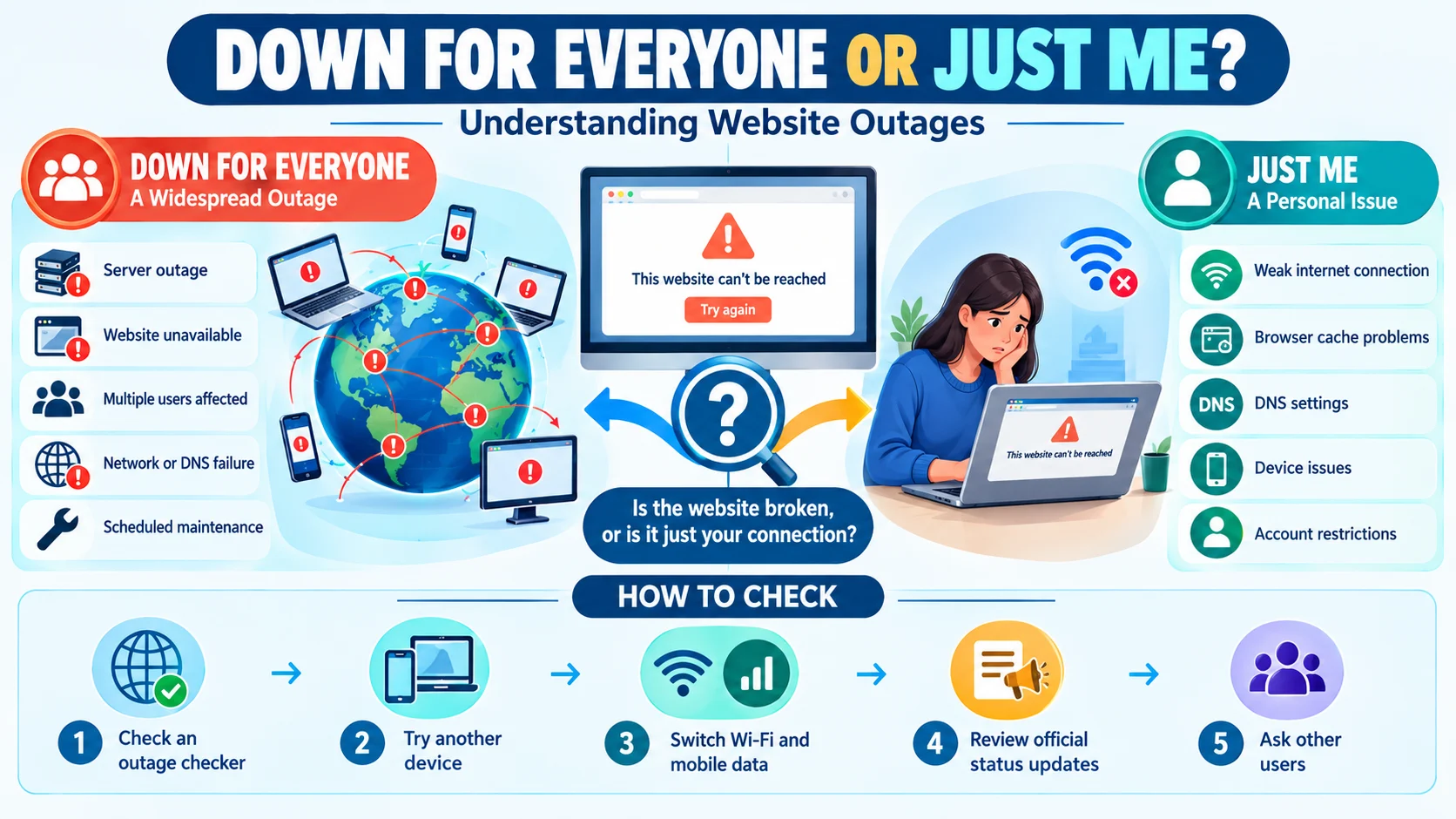
The expression is particularly useful because it identifies two different possibilities. A widespread outage usually involves the website’s servers or infrastructure, whereas an individual problem may involve a browser, device, network, or account.
Therefore, the phrase is both a casual internet expression and a practical question used during technical troubleshooting.
Down for Everyone or Just Me in Simple Words
In simple words, this phrase means checking whether a website or app is broken for all users or only for you.
Here are a few situations that explain the expression:
- A website refuses to open, so you check whether others can access it.
- An application crashes, and you wonder whether its servers are experiencing problems.
- A social media platform stops refreshing, making you question whether the service is unavailable.
- An online game disconnects, so you investigate whether the gaming servers are offline.
- A streaming service displays an error, and you want to know whether other viewers have the same issue.
In each situation, the main goal is to identify the source of the problem before attempting a solution.
Is Down for Everyone or Just Me a Slang Phrase?
Yes, down for everyone or just me can be considered an informal internet expression. However, it is more accurately described as a common online phrase rather than traditional slang.
People frequently use it in digital conversations, social media discussions, online communities, and technical support forums.
For example:
- “Is YouTube down for everyone or just me?”
- “My banking app isn’t opening. Down for everyone or just me?”
- “Is the website broken, or am I having internet problems?”
- “Twitter isn’t loading. Anyone else experiencing this?”
- “The game servers seem unavailable. Is it happening to everyone?”
The wording is conversational and straightforward. Moreover, it communicates a technical concern without requiring complicated terminology.
Why Do People Say Down for Everyone or Just Me?
People use this expression because internet problems can have different causes. Before changing settings, restarting devices, or contacting customer support, they want to determine whether the problem is widespread.
Several common reasons explain why someone might ask this question.
To Check Whether a Website Is Experiencing an Outage
Sometimes, a website’s servers become unavailable because of technical failures, maintenance, or unexpected traffic.
Consequently, thousands of visitors may experience the same problem simultaneously. Checking the service’s availability helps users understand whether waiting is the best option.
To Identify Personal Internet Problems
A website might work perfectly for other visitors while remaining inaccessible on one person’s device.
In that case, the problem could involve a router, internet service provider, DNS settings, or browser configuration.
Therefore, checking the website from another connection can help identify the cause.
To Avoid Unnecessary Troubleshooting
Imagine spending twenty minutes changing browser settings when the website’s servers are actually offline.
That would be frustrating and unnecessary.
For this reason, people often check whether a service is experiencing a widespread outage before attempting more complicated troubleshooting steps.
To Confirm Reports From Other Users
Online communities make it easier to compare experiences.
For instance, if several people report that a particular application is not working, their comments may indicate a broader service problem.
However, user reports are not always reliable. An official service-status page or independent outage checker can provide additional information.
How to Check If a Website Is Down for Everyone or Just Me
If a website refuses to load, you can perform several simple checks to identify the problem.
Use an Online Website Status Checker
One of the easiest methods is using an online outage-checking service.
Popular options include:
- Down For Everyone Or Just Me: A website availability checker that tests whether a website appears accessible.
- <a href=”https://downdetector.com/“>Downdetector</a>: Shows user-submitted reports about problems affecting websites, applications, and online services.
- <a href=”https://www.isitdownrightnow.com/“>Is It Down Right Now</a>: Provides website availability information and basic server-response details.
- <a href=”https://www.statuspage.io/“>Atlassian Statuspage</a>: A platform organizations use to publish service-status updates.
These tools can help you determine whether a problem might affect multiple users. Nevertheless, their results are not absolute proof because testing locations, networks, and reporting delays can influence the results.
Try Opening the Website on Another Device
Another useful method is testing the website on a different device.
For example, if a website does not open on your laptop, try accessing it through your smartphone.
If it works on your phone but not your computer, the problem may involve your browser, device settings, or network configuration.
Switch Between Wi-Fi and Mobile Data
Your internet connection might be responsible for the problem.
Therefore, disconnect your device from Wi-Fi and try using mobile data instead.
If the website loads successfully through mobile data, your Wi-Fi network or internet provider may be experiencing an issue.
Check the Website’s Official Social Media Accounts
Many companies publish outage announcements through their official social media accounts.
For example, an online platform may explain that users are experiencing login problems or that engineers are investigating a service interruption.
Additionally, some organizations maintain dedicated status pages that report incidents and maintenance schedules.
Ask Other People to Test the Website
You can also ask friends, coworkers, or online community members whether they can access the same website.
If several people experience identical problems across different networks, a widespread outage becomes more likely.
However, remember that people using the same internet provider or geographic region may experience similar network problems even when the website itself remains operational.
Down for Everyone vs. Just Me: What’s the Difference?
Although these situations can look similar, they have different causes.
| Situation | Down for Everyone | Just Me |
|---|---|---|
| Meaning | A widespread service problem | An individual access problem |
| Common cause | Server outage or service failure | Device or network issue |
| Other users | May experience the same problem | Usually can access the service |
| Possible solution | Wait for the service to recover | Troubleshoot your connection |
| Example | A social media platform stops working globally | Your browser cannot load the platform |
Understanding this distinction makes troubleshooting easier.
For instance, if an entire website is unavailable, changing your browser settings will probably not solve the problem. On the other hand, if everyone else can access it, investigating your own connection makes more sense.
Common Reasons a Website Goes Down for Everyone
A website can become unavailable for several technical reasons. Although some interruptions last only a few minutes, others may require more extensive repairs.
Server Problems
Websites depend on servers to process requests and deliver information.
When a server crashes, becomes overloaded, or experiences a hardware failure, visitors may receive error messages or fail to access the website.
Scheduled Maintenance
Website owners sometimes temporarily disable services to install updates, improve security, or repair technical problems.
During this period, users may see a maintenance notice or an unavailable message.
Unexpected Traffic
A sudden increase in visitors can overwhelm website infrastructure.
For example, an online store might receive enormous traffic during a major sale. If its servers cannot handle the demand, the website may become slow or temporarily unavailable.
DNS Problems
DNS stands for Domain Name System. It helps translate website names into the numerical addresses computers use to communicate.
When DNS services experience problems, users may have difficulty reaching websites even when the underlying servers remain operational.
Cyberattacks
Certain cyberattacks can interrupt website availability.
For example, a distributed denial-of-service attack, commonly called a DDoS attack, floods a service with traffic from multiple sources. Consequently, legitimate visitors may struggle to access it.
Software Updates and Technical Errors
Website updates can occasionally introduce unexpected bugs.
Similarly, changes to databases, plugins, server configurations, or application code may interrupt normal operations.
As a result, developers sometimes need to investigate and reverse problematic changes before restoring service.
Common Reasons a Website Is Down Just for You
Not every website problem is caused by the website itself. In many cases, your device or connection may be responsible.
Weak Internet Connection
A slow or unstable connection can prevent websites from loading correctly.
Try opening another website or application to see whether your internet connection works normally.
Browser Cache Problems
Browsers store temporary information to improve loading speed.
However, outdated or corrupted cached data can occasionally interfere with website functionality.
Clearing your browser cache may help resolve the issue.
Incorrect DNS Settings
Your device or network may use DNS settings that are temporarily unavailable or incorrectly configured.
Switching to a reliable DNS provider can sometimes improve website access, although this should be done carefully.
Firewall or Security Software
Security applications and firewalls sometimes block websites they consider suspicious.
Consequently, a website may appear unavailable even when it works normally for other visitors.
Check your security software settings before changing or disabling protection.
Browser Extensions
Certain browser extensions can interfere with website scripts, cookies, or page loading.
For example, an outdated extension may prevent a website from displaying correctly.
Testing the page in a private browsing window can help identify this possibility.
Account Restrictions
Sometimes, the website itself works normally, but your account cannot access a particular feature.
This may happen because of temporary restrictions, expired subscriptions, incorrect login information, or account security checks.
In such cases, the problem is not necessarily a website outage.
Real-Life Examples of Down for Everyone or Just Me
The following examples show how people naturally use the expression in different situations.
Example 1: Social Media
Person A: “Instagram isn’t refreshing for me.”
Person B: “Is it down for everyone or just you?”
Here, the second person wants to know whether Instagram is experiencing a widespread issue.
Example 2: Online Shopping
Person A: “I can’t open the shopping website.”
Person B: “Try checking whether it’s down for everyone or just you.”
This example shows how the expression can help identify website availability problems.
Example 3: Online Gaming
Person A: “I keep getting disconnected from the game.”
Person B: “Maybe the servers are down. Check the server status.”
In this situation, the issue may involve the game’s infrastructure rather than the player’s device.
Example 4: Work and Productivity
Person A: “The company dashboard isn’t loading.”
Person B: “Is anyone else having the same problem?”
The conversation helps determine whether the issue affects multiple employees.
Example 5: Video Streaming
Person A: “Netflix won’t play anything.”
Person B: “Is it down for everyone or just me?”
Both people are trying to determine whether the streaming service is experiencing technical difficulties.
Example 6: Website Development
Developer: “The website stopped responding after the latest update.”
Colleague: “Does it happen for everyone or only on your network?”
This example shows how the expression can also be useful in professional technical discussions.
Example 7: Online Banking
Person A: “My banking app keeps showing an error.”
Person B: “Check the bank’s official service-status information before trying again.”
Here, checking official information is especially important because banking applications involve sensitive financial activity.
How to Fix a Website That Is Not Working
If an outage checker suggests that a website is available to other users, you can try the following troubleshooting methods.
Refresh the Website
Start with a simple page refresh.
Sometimes, a temporary loading error prevents a website from opening correctly. Reloading the page may solve the problem.
Restart Your Router
If several websites are unavailable, restart your router.
Turn it off, wait approximately 30 seconds, and then turn it back on. After the connection returns, test the website again.
Clear Browser Cache and Cookies
Old browser data can sometimes cause loading problems.
Open your browser’s privacy settings and clear the relevant cached files and cookies. Be aware that clearing cookies may sign you out of websites.
Try Another Browser
If a website does not work in Chrome, try opening it in Firefox, Edge, or another browser.
If the page works elsewhere, the original browser may have a configuration or extension problem.
Disable Problematic Extensions
Temporarily disable browser extensions that may interfere with website functionality.
However, avoid disabling essential security protections without a clear reason.
Restart Your Device
Restarting your computer or smartphone can resolve temporary software and network issues.
Additionally, it gives background applications an opportunity to restart properly.
Contact Your Internet Provider
If multiple websites remain unavailable across your devices, your internet provider may be experiencing a network problem.
Contact its support team for information about local service interruptions.
Is Down for Everyone or Just Me a Website?
The expression is commonly associated with a website availability checker called Down for Everyone or Just Me.
Its purpose is to help users investigate whether a website is accessible from outside their own connection.
When you enter a website address into an availability checker, the service attempts to access that website and evaluates its response.
Depending on the tool, the result may indicate that the website appears unavailable or that it responds normally.
This distinction can help users decide whether to investigate their own internet connection or wait for the website to recover.
However, an important detail is that a website checker cannot always confirm what every visitor experiences. Some websites operate through regional servers, content delivery networks, security filters, and location-based restrictions.
Therefore, a website might work in one country but remain unavailable in another.
What Does Website Down Mean?
The phrase website down means that a website is temporarily or permanently unavailable to visitors.
It may fail to load, display an error message, or stop responding to requests.
For example, users may encounter messages such as:
- 404 Not Found
- 403 Forbidden
- 500 Internal Server Error
- 502 Bad Gateway
- 503 Service Unavailable
- Connection Timed Out
Each message can indicate a different problem.
A 404 error generally means that the requested page cannot be found. Meanwhile, a 500 error indicates an internal server problem.
Similarly, a 503 error usually means that the server cannot handle the request at that time.
Consequently, understanding the specific error message can make troubleshooting more effective.
Is Down for Everyone or Just Me the Same as an Internet Outage?
No. These expressions are related, but they do not mean exactly the same thing.
An internet outage generally refers to an interruption affecting an internet connection or network service.
By contrast, down for everyone or just me is a question that helps identify whether an unavailable website or application has a widespread problem.
For example, your internet connection may work perfectly while one particular website remains unavailable.
Likewise, your internet provider might experience an outage that prevents you from accessing several websites simultaneously.
Therefore, checking multiple services can help distinguish between these situations.
Common Mistakes When Using Down for Everyone or Just Me
Although the phrase is easy to understand, people sometimes misunderstand what website availability results actually mean.
Assuming Every Loading Error Means a Website Is Down
A website that fails to load on your device is not necessarily experiencing a widespread outage.
Check other websites and test the connection before reaching that conclusion.
Trusting One Outage Checker Completely
Different checking tools may use different locations and testing methods.
Therefore, one negative result does not always prove that a website is unavailable to everyone.
Confusing a Slow Website With a Completely Down Website
A slow website may still respond to requests.
However, a completely unavailable service may fail to establish a connection or return an error.
These situations are related but different.
Ignoring Regional Problems
Some websites experience outages limited to specific countries or regions.
Consequently, a service might work for international visitors while remaining inaccessible to local users.
Sharing Unverified Outage Information
Avoid claiming that a website is down for everyone based on your personal experience alone.
Instead, check official announcements, outage reports, and independent availability tools.
Related Phrases and Their Meanings
Several expressions have meanings similar to down for everyone or just me.
| Related Phrase | Meaning | Example |
|---|---|---|
| Is it working? | Asking whether something functions properly | “Is the website working?” |
| Is the server down? | Asking whether a server is unavailable | “Is the game server down?” |
| Website outage | A period when a website is unavailable | “The store reported a website outage.” |
| Service interruption | A temporary disruption in service | “There is a service interruption.” |
| Not loading | A page or application fails to display | “The homepage isn’t loading.” |
| Connection error | A problem establishing a connection | “I’m getting a connection error.” |
| Is anyone else having this issue? | Asking whether others experience the same problem | “Is anyone else having this issue?” |
| Back online | A service has become available again | “The website is finally back online.” |
| Server unavailable | A server cannot currently provide the requested service | “The server is unavailable.” |
| Down for maintenance | A service is temporarily unavailable for planned work | “The website is down for maintenance.” |
Advantages and Disadvantages of Website Outage Checkers
Website availability tools offer several benefits. Nevertheless, they also have limitations.
Advantages
- Save time: You can quickly investigate whether a website appears unavailable.
- Reduce unnecessary troubleshooting: You may avoid changing device settings when the website itself has a problem.
- Provide useful information: Some tools display outage reports and historical availability.
- Help businesses: Website owners can use monitoring services to identify potential interruptions.
- Support better decisions: Users can decide whether to wait, investigate their connection, or contact customer support.
Disadvantages
- Results are not always conclusive: A single test cannot represent every user or location.
- Regional differences matter: Some websites experience location-specific problems.
- Reporting delays occur: User-submitted outage reports may not reflect the latest situation.
- False alarms are possible: Temporary network problems can sometimes produce misleading results.
- Advanced problems require technical investigation: Basic checkers cannot identify every server, DNS, or application issue.
How to Use Down for Everyone or Just Me in Social Media Posts
People also use this expression when discussing website problems on social media.
It works particularly well when someone wants to compare experiences or ask whether a particular service is experiencing technical difficulties.
Here are some natural examples:
- “Is YouTube down for everyone or just me?”
- “My Instagram feed isn’t refreshing. Anyone else?”
- “Is Google acting weird today?”
- “Why isn’t this website loading?”
- “Are the servers down again?”
- “Does anyone else have problems accessing this app?”
- “Is the internet acting up, or is it just my connection?”
- “Can’t log in today. Is anyone else experiencing this?”
These examples sound natural because they focus on a specific problem rather than using complicated technical language.
Down for Everyone or Just Me vs. Is It Just Me?
Both expressions ask whether other people are experiencing the same situation. However, their meanings are slightly different.
Down for everyone or just me specifically focuses on website, application, or online service availability.
On the other hand, is it just me? has a much broader meaning. People use it to ask whether others share an opinion, feeling, experience, or observation.
For example:
- “Is this website down for everyone or just me?” focuses on technical availability.
- “Is it just me, or is this movie really boring?” asks about a personal opinion.
- “Is it just me, or is the internet unusually slow today?” asks about a shared experience.
Therefore, the first phrase is more specific, while the second works in many everyday situations.
Tips for Preventing Website Access Problems
Although users cannot prevent every website outage, they can reduce the chances of experiencing problems on their own devices.
- Keep your browser updated to the latest supported version.
- Restart your router occasionally when connection problems occur.
- Install operating system security updates.
- Avoid installing unnecessary browser extensions.
- Use a reliable internet connection.
- Keep your device’s network settings properly configured.
- Maintain updated security software.
- Check whether your internet provider has announced maintenance.
- Avoid opening suspicious links that may compromise your device.
Additionally, website owners should use reliable hosting, regular backups, security monitoring, and uptime monitoring tools to reduce service interruptions.
Practice Exercises: Test Your Understanding
Choose the correct answer to check how well you understand the expression.
Exercise: Multiple-Choice Questions
Which situation best describes “down for everyone or just me”?
A. Asking whether a website is unavailable to all users or only you.
B. Asking whether everyone likes the same movie.
C. Asking someone to turn off their computer.
D. Asking whether a website has changed its design.
Answer: A. Asking whether a website is unavailable to all users or only you.
What should you do first if a website refuses to load?
A. Delete your operating system.
B. Check your internet connection and website availability.
C. Buy a new computer immediately.
D. Change your account password without checking anything.
Answer: B. Check your internet connection and website availability.
What does a widespread website outage mean?
A. Only one person’s browser has stopped working.
B. A website is unavailable to multiple users.
C. A computer battery is empty.
D. A website has changed its logo.
Answer: B. A website is unavailable to multiple users.
Which tool can help users check reports of website and service outages?
A. Downdetector.
B. A calculator.
C. A photo editor.
D. A music player.
Answer: A. Downdetector.
Does a website checker always prove that a website is unavailable to every person worldwide?
A. Yes, every time.
B. No, results can vary by location and testing method.
C. Only during weekends.
D. Only when using mobile data.
Answer: B. No, results can vary by location and testing method.
FAQs
What does down for everyone or just me mean?
It means asking whether a website, application, or online service is unavailable to all users or whether the problem affects only your device, account, or internet connection.
Is down for everyone or just me slang?
It is an informal internet expression commonly used in online conversations. It is also associated with website outage-checking tools.
How do I know if a website is down for everyone?
Use an independent website availability checker, review official service-status announcements, and ask people using different networks to test the website.
What does it mean when a website is down?
It means the website is unavailable or cannot respond properly to visitors’ requests. Server failures, maintenance, network problems, and software errors can cause this situation.
Why is a website not working for me but working for others?
The problem may involve your internet connection, browser cache, DNS settings, device configuration, security software, or account restrictions.
What is the best website to check if a site is down?
Down For Everyone Or Just Me, Downdetector, and Is It Down Right Now are useful options. Each uses different methods, so comparing results can provide a clearer picture.
Can a website be down in one country but working in another?
Yes. Regional server problems, DNS issues, internet routing failures, and geographic restrictions can make a website accessible in some locations but unavailable in others.
Does down for everyone mean the internet is not working?
No. It usually refers to a particular website or online service being unavailable. Your internet connection may still work normally.
What should I do if a website is down?
First, check whether the issue affects other users. If the website has a widespread outage, wait for the service provider to resolve it. Otherwise, troubleshoot your browser, device, or internet connection.
Is a website outage permanent?
Not necessarily. Most website outages are temporary and are resolved after technical problems are fixed. However, some websites may shut down permanently.
What is the difference between a server outage and an internet outage?
A server outage affects the server or service hosting a website or application. An internet outage affects the network connection that allows users to access online services.
Can a VPN cause a website to stop working?
Yes. Some websites block certain VPN addresses, while VPN routing or DNS problems can also interfere with access. Testing the website without the VPN may help identify the cause.
What does it mean when a website says 503 Service Unavailable?
A 503 error generally means the server cannot handle the request temporarily. The cause may involve maintenance, high traffic, or another server-side problem.
Is down for everyone or just me the same as is it down right now?
Both expressions relate to website availability. However, “is it down right now?” asks about the current status, while “down for everyone or just me” specifically compares a widespread problem with an individual access issue.
Why do people ask if a website is down for everyone or just me?
They want to identify whether a problem comes from the website itself or their personal connection. This helps them avoid unnecessary troubleshooting and understand whether other users are affected.
Key Takeaways and Summary
The expression down for everyone or just me is a popular way to ask whether a website, app, or online service is experiencing a widespread outage or an individual access problem.
Here are the most important points to remember:
- The phrase focuses on website and application availability.
- It helps distinguish widespread outages from personal connection problems.
- Server failures, maintenance, and unexpected traffic can affect multiple users.
- Browser settings, DNS issues, and weak internet connections can cause individual problems.
- Online tools such as Downdetector can help investigate service interruptions.
- Official status pages provide useful information about reported incidents.
- An outage checker cannot guarantee that a website works or fails for every person worldwide.
Ultimately, understanding this expression makes it easier to discuss internet problems and identify their possible causes. Instead of immediately assuming that your device is broken, check whether other users are experiencing the same issue.
Conclusion
The phrase down for everyone or just me is a simple but useful expression in today’s internet-driven world. It helps people determine whether a website, application, or online service is experiencing a widespread outage or whether an individual device or connection is causing the problem.
Although website errors can be frustrating, identifying their source makes troubleshooting much easier. You can use outage-checking tools, review official service announcements, test another device, or switch between Wi-Fi and mobile data to investigate the issue.
Furthermore, remember that a website appearing unavailable in one location does not necessarily mean it has stopped working worldwide. Different networks, regions, and technical conditions can produce different results.
The next time your favorite website refuses to load, don’t panic. Simply ask, “Is it down for everyone or just me?” and investigate before making unnecessary changes to your device.